Choose to set search options to be applied when adding images from a folder. These can be used to filter the images, enabling continual processing of images within the same folder.
For example, you may choose to resize and replace the original images in the same folder. You could use the date modified search option to only fetch images newer than the last date you resized.


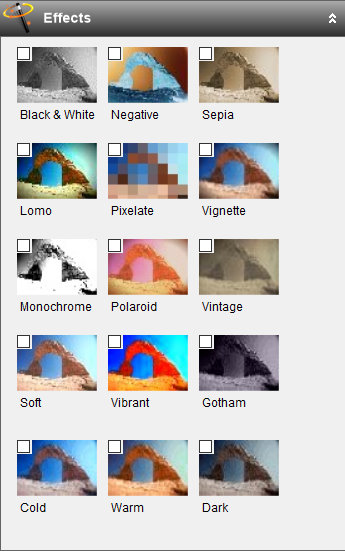
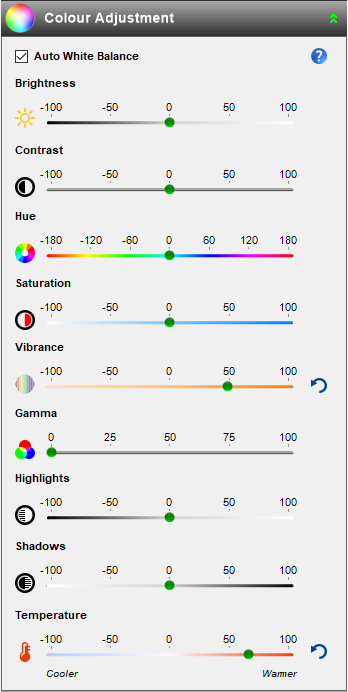
Change the visual appearance of your photos by using Fotosizer's effects:
Fotosizer is available in the following languages: English, French, German, Spanish, Italian, Turkish, Portuguese (Brazilian), Portuguese (Portugal), Russian, Ukrainian, Chinese (Traditional) Taiwan Region, Chinese (Simplified), Dutch, Danish, Bulgarian, Norwegian, Slovak, Slovenian, Korean, Hungarian, Romanian, Greek, Serbian (Latin), Czech, Polish, Latvian, Arabic (Saudia Arabia), Hindi, Vietnamese, Swedish, Finnish, Armenian, Japanese, Thai, Indonesian.


Copy EXIF information (JPEG), copies information stored with the photo to the resized photo such as:
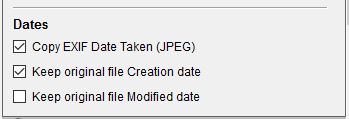
Choose which of the date attributes of your photos are maintained when you resize them:

Fotosizer supports importing and exporting of common image formats:


View the real time preview of the resize settings, watermarks and other effects right on the photos you are changing so there are no surprises afterwards. Know precisely how the photos will look beforehand.
View the real time preview of the changes along side the original image.
Choose between the actual size of the photo in the preview or fit the photo to the window to view all of it.
Move between the each photo to preview how they will be changes.
Displays the new dimensions and new file size per image inside the preview.